The dashboard
Resourcefull.AspNetCore includes a small dashboard: a page in your application that shows what's stored. Map it
with one line, much as you'd map Swagger UI, and open it in a browser while you build or support your application.
By default it only reads. While you develop, you can also let it upload, delete and change files, as described in
Making changes.
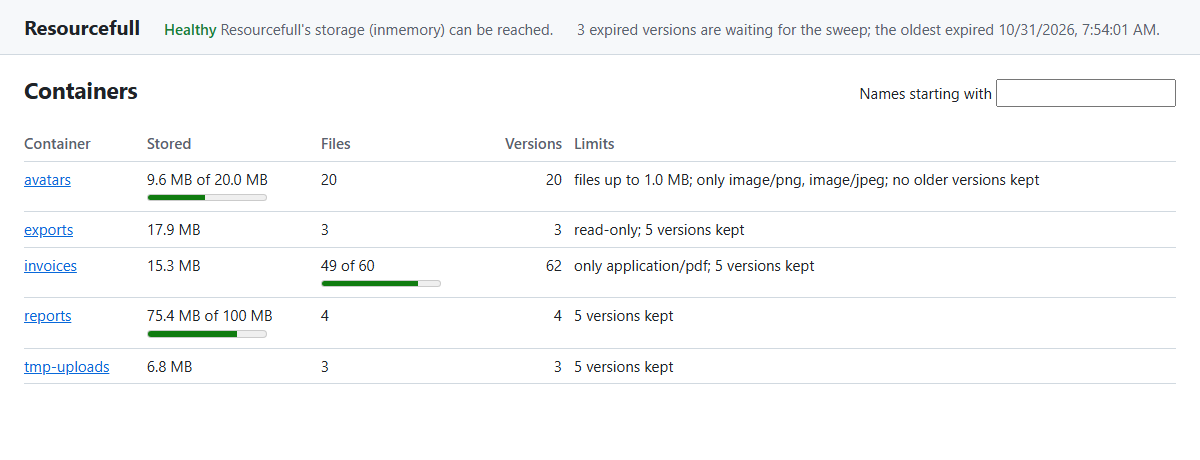
What it shows
Along the top, every view shows:
- Health: the result of Resourcefull's health check, including migrations the database is missing, or has from a newer release.
- Expiry: how many expired versions are waiting for the sweep to delete them, and when the oldest of them expired. A count that keeps growing, or an oldest expiry far in the past, means the sweep isn't running or isn't keeping up. A read-only container's expired versions count too, since the sweep keeps them until the container is writable again. With a provider that doesn't support expiry, this line is left out.
Containers
The first view lists the containers, 50 at a time, with a filter by the start of their names. For each one, it shows
its stored size against its MaxContainerSize, its files against MaxResourceCount, how many versions it holds,
and the rest of its policy: whether it's read-only, the types it allows, the largest file
it takes and how many versions it keeps. A bar under a limit shows how close the container is to it.
One container
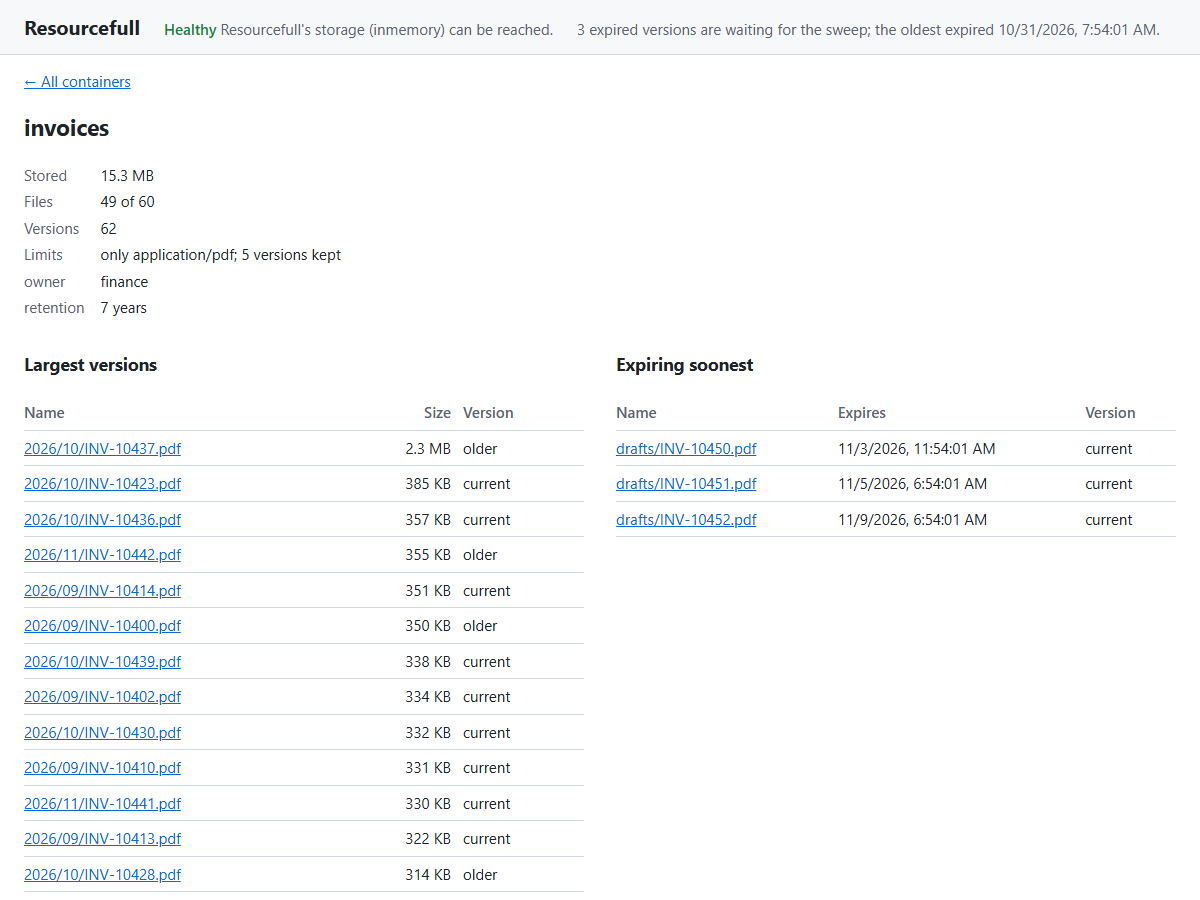
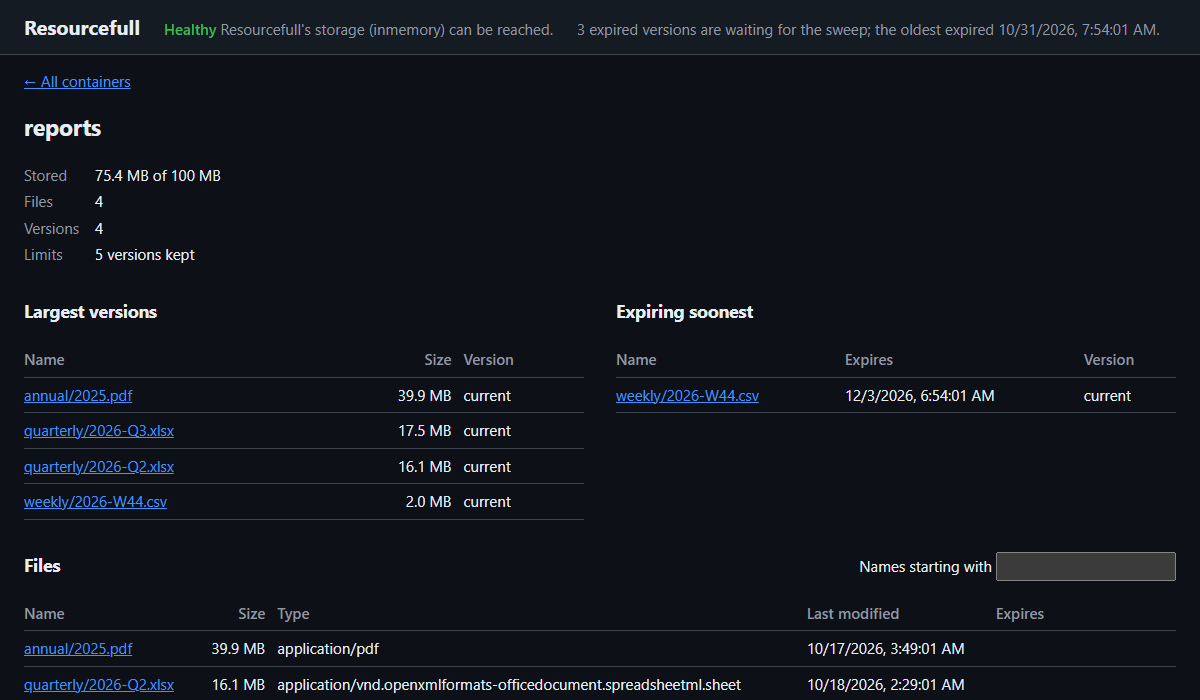
Select a container to see its metadata and limits, then two short lists:
- Largest versions: its 20 largest versions, current and older alike, since a container's stored size counts
every version. When a container nears its
MaxContainerSize, this is what's filling it. An older version that's large is often one to delete, or a sign that the container keeps more versions than it needs. - Expiring soonest: the 20 versions that expire first, so you can see what the sweep deletes next before it does.
Below them are its files, 50 at a time, with each one's size, type, last change and expiry.
One file
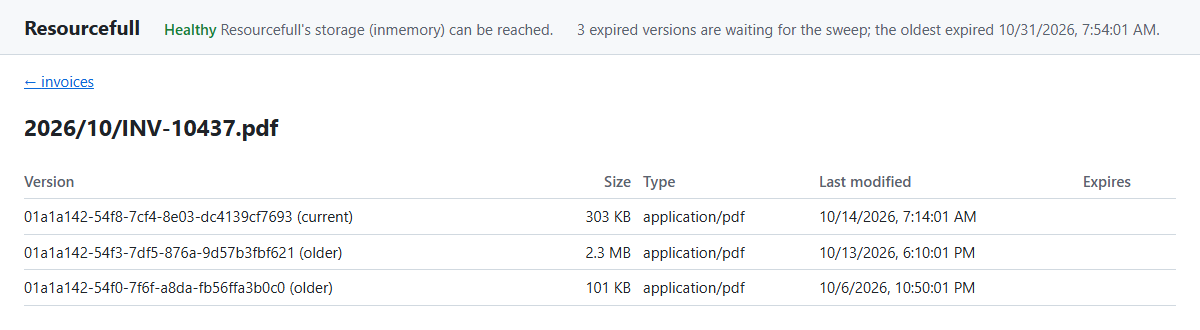
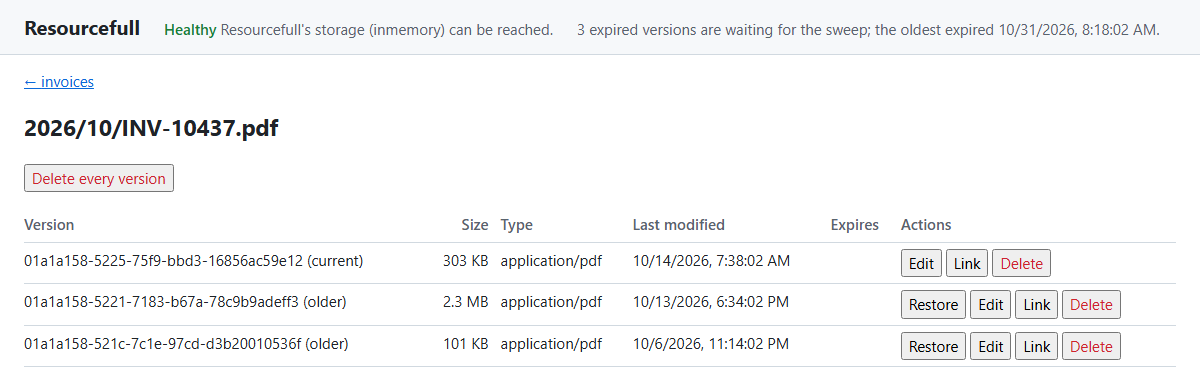
Select a file's name, in any of those lists, to see every version of it: the current one first, then the older ones from the newest, each with its version ID, size, type, last change and expiry.
Setting it up
using Resourcefull.AspNetCore;

builder.Services.AddHealthChecks().AddResourcefullSqlServerCheck();

app.UseAuthentication();
app.UseAuthorization();
app.MapResourcefullDashboard("/resourcefull").RequireAuthorization("admins");
Then open /resourcefull in a browser. admins is an authorization policy you define with AddAuthorization, as in
Securing file endpoints. Registering the health check is optional; without one, the page
says none is registered.
Who may see it
The dashboard shows container names, file names and metadata, which can be personal data. So it doesn't run until
you've decided who may see it: until then, every request to it throws InvalidOperationException, saying what to add.
Any one of these counts as a decision:
RequireAuthorizationon the groupMapResourcefullDashboardreturns, with or without a policy.- A fallback authorization policy (
AuthorizationOptions.FallbackPolicy) that covers every endpoint without its own. AllowAnonymous()on the group, which shows it to anyone who can reach it. Use that only for a tool that runs on your own machine, never on a server.
Because MapResourcefullDashboard returns the route group, anything else you'd put on endpoints applies to it too,
such as RequireHost("admin.example.com") or rate limiting.
Health checks
The dashboard runs the health checks named resourcefull, the name Resourcefull's checks get unless you give them
another. If you registered yours under other names, say which:
app.MapResourcefullDashboard("/resourcefull", new ResourcefullDashboardOptions
{
    HealthChecks = ["files-db", "archive-db"]
}).RequireAuthorization("admins");
Making changes
Warning
Changes aren't ready for production as they are. They're meant for development, much as Swagger UI is: a quick way to try things against your own data. Before you turn them on anywhere else, see Before you use changes beyond development.
With AllowChanges, the dashboard can change what's stored:
if (app.Environment.IsDevelopment())
{
    app.MapResourcefullDashboard("/resourcefull", new ResourcefullDashboardOptions { AllowChanges = true })
        .AllowAnonymous();
}
else
{
    app.MapResourcefullDashboard("/resourcefull").RequireAuthorization("admins");
}
It then adds:
- On the list of containers: a form to create a container.
- On a container: a form to upload a file under its own name or one you give it, replacing any file with that name if you check the box. There's also a button that deletes the container and everything in it, once you type its name to confirm.
- On a file's versions: buttons for each version to restore an older version as the current one, edit its content type, expiry and metadata, or delete it, and one to delete every version of the file.
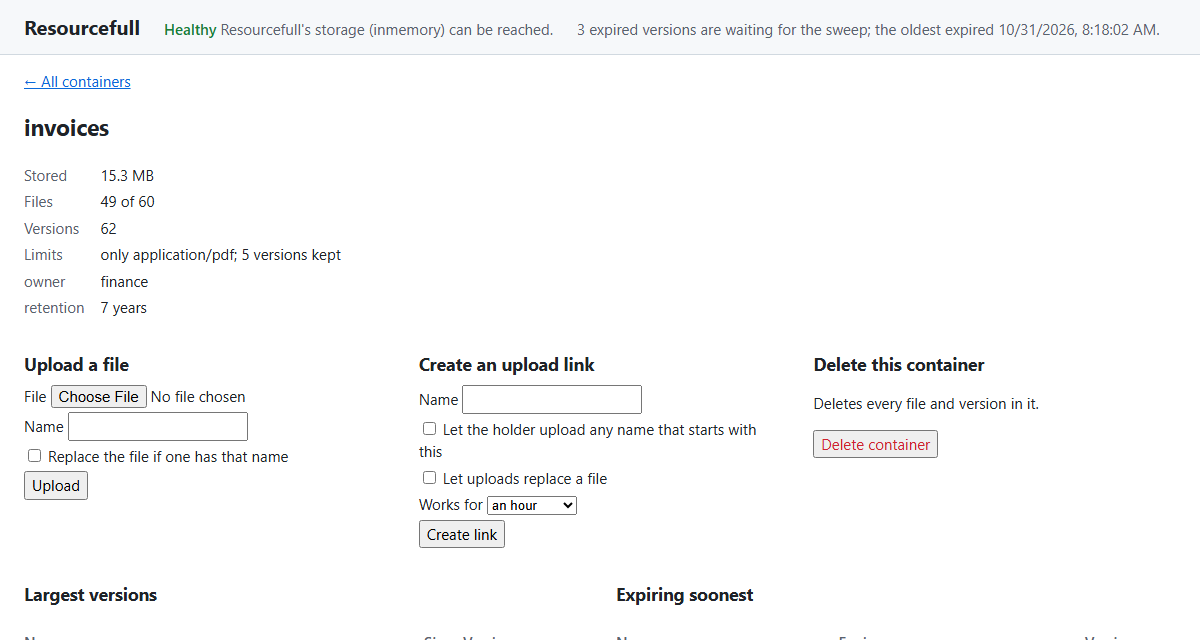
Each change goes through the same client methods your code uses, so the container's policy applies to it as it would to your code: a read-only container refuses changes, and an upload must fit the container's limits and allowed types. When the store refuses a change, the page says why.
Links
If your application serves download links or upload links, the dashboard
can create them too. Tell it the path of each endpoint, with {token} where the token goes, and register the link
signer with AddResourcefullLinks:
builder.Services.AddResourcefullLinks();

app.MapResourcefullDashboard("/resourcefull", new ResourcefullDashboardOptions
{
    AllowChanges = true,
    DownloadLinkPath = "/shared/{token}",
    UploadLinkPath = "/upload/{token}"
}).AllowAnonymous();
Each version then gets a Link button, which creates a download link to that version that works for an hour. A container gets a form to create an upload link that works for an hour, a day or seven days, either for one name or for any name that starts with what you type. The dashboard shows the link to copy. Leave either path out, and the dashboard doesn't offer that kind of link.
How the dashboard protects changes
- They're off by default. Mapping the dashboard without
AllowChangesmaps no endpoint that changes anything. - Anyone who can open the dashboard can change things. Changes follow the same authorization as the rest of the
dashboard, so with
AllowChanges, everyone it lets in can delete files. - Another site can't make them. If you're signed in to your application, another site's page could make your
browser send a request to the dashboard's change endpoints, with your cookies attached. The dashboard's page
sends a header of its own with every change,
X-Resourcefull-Dashboard, and the change endpoints refuse a request without it. A browser sends a header like that to another site only if that site agrees, and the dashboard never does. A request whose browser reports, inSec-Fetch-Site, that it came from anywhere but the dashboard's own origin is refused too. Each refusal is logged as a warning, under the same category as the changes. - Each change is logged. The dashboard logs every change it makes at
Information, under the categoryResourcefull.AspNetCore.Dashboard, with the user's name, the action, and the container, file and version, so you have a record of who did what.
Before you use changes beyond development
The dashboard's page is the same wherever it runs, so what keeps changes safe is how you map it. Before you turn on
AllowChanges on a shared or production server:
- Require a policy only administrators meet, such as
RequireAuthorization("admins"), rather than any signed-in user. Or map a read-only dashboard for most people and one with changes, at another path, for administrators. - Keep it off the public internet, for example with
RequireHost("admin.internal.example.com")or a network rule, so the change endpoints can't be reached from outside. - Keep the logs. Send the
Resourcefull.AspNetCore.Dashboardcategory somewhere they're kept, if the log is your record of who changed what. - Think about CORS. If your application allows cross-origin requests with credentials from other sites, those sites can send the dashboard's header. Don't apply such a policy to the dashboard's endpoints.
What it costs
Each page of containers shows up to 50, and each one's usage is a query of its own (policies are cached), so a page is up to 50 small queries on top of the listing. Usage adds up the container's versions, so the more versions a container holds, the longer its query takes.
The largest and expiring lists read every version in the container, since neither order has an index of its own. With SQL Server, PostgreSQL and SQLite, each list is one query over the container's version rows, much like its usage, without reading any content, and the expiry count is one read of the index of versions that expire, the same read the sweep starts with. With the in-memory and S3 providers, the lists are built by reading the container's versions a page of names at a time.
The dashboard is built for someone looking now and then, not for a wall display refreshing every few seconds.
The JSON endpoints
The page reads these endpoints under {pattern}/api/, which you can call yourself, as a small admin API, to show the
same data your own way. They answer JSON with camelCase names whatever your application's JSON settings are, and
follow the same authorization as the page.
| Endpoint | Returns |
|---|---|
GET api/health |
status (Healthy, Degraded or Unhealthy, or null when no check is registered) and checks: each one's name, status, description and data. |
GET api/containers?prefix=&continuationToken= |
items: up to 50 containers, and continuationToken for the next page, or null. |
GET api/container?name= |
One container, or 404 when it doesn't exist. |
GET api/resources?container=&prefix=&continuationToken= |
items: up to 50 of the container's current files, and continuationToken; 404 when the container doesn't exist. |
GET api/largest?container= |
items: the container's 20 largest versions, current and older, largest first; 404 when the container doesn't exist. |
GET api/expiring?container= |
items: the container's 20 versions that expire soonest, soonest first, leaving out versions without an expiry; 404 when the container doesn't exist. |
GET api/versions?container=&name= |
items: every version of one file, the current one first; 404 when the file or the container doesn't exist. |
GET api/expired |
supported: whether the provider supports expiry; count: how many expired versions are waiting for the sweep, counting up to 100; more: whether there are more than that; and oldestExpiry: when the first of them expired, or null when none are waiting. |
GET api/features |
changes, downloadLinks and uploadLinks: whether the dashboard was mapped to allow each. |
With AllowChanges, these endpoints change what's stored. Each needs the X-Resourcefull-Dashboard header, with any
value, and answers 403 Forbidden without it. When the store refuses a change, they answer with the status code and
problem details the exception handler would, such as 409 Conflict for a name that's taken or 403
Forbidden for a read-only container, and 404 Not Found when what they change doesn't exist.
| Endpoint | Does |
|---|---|
PUT api/upload?container=&name=&replace= |
Stores the request body as the file, with the request's Content-Type; with replace=true, as a new version if a file already has that name. Answers 201 Created with the version. |
DELETE api/resource?container=&name=&versionId= |
Deletes one version, or with no versionId, every version of the file. |
POST api/restore?container=&name=&versionId= |
Restores an older version as the current one, and answers with the new version. |
PUT api/expiry?container=&name=&versionId= |
Sets the version's expiry from the body's expiresAt, or clears it with null; with no versionId, the current version's. |
PUT api/content-type?container=&name=&versionId= |
Sets the version's content type from the body's contentType. |
PUT api/metadata?container=&name=&versionId= |
Replaces the version's metadata with the body's metadata. |
POST api/containers |
Creates a container named by the body's name. |
DELETE api/container?name= |
Deletes the container and everything in it. |
POST api/download-link?container=&name=&versionId= |
With DownloadLinkPath: creates a download link that works for the body's expiresInMinutes (an hour if it's left out, seven days at most), and answers with its url and expiresAt. |
POST api/upload-link?container= |
With UploadLinkPath: creates an upload link for the body's name or its namePrefix (exactly one of them), that works for expiresInMinutes (an hour if it's left out, seven days at most), and lets uploads replace a file if replace is true. Answers with its url and expiresAt. |
A container holds name, metadata, usage and policy. usage holds storedSize in bytes, resourceCount and
versionCount, and 4.0 deletedSize in bytes and deletedVersionCount, what the container's
bin holds. policy holds maxResourceSize and maxContainerSize in bytes, maxResourceCount and
allowedContentTypes, each null when there's no limit, plus readOnly and maxVersions, the versions kept per
name. A file or version holds name, versionId, isLatest (whether it's the current version), contentType,
contentLength, lastModified, expiresAt and metadata.
A malformed continuation token, a token from a listing with a different prefix, or a container or file name the
name rules refuse gets 400 Bad Request.
Names go in the query string rather than the path, because container and file names can hold /.
To list versions by size or expiry in your own code, rather than over HTTP, call GetTopVersionsAsync on a container
client, and GetExpiredVersionsAsync on the service client; the dashboard's lists come from those.
The page
The page is three files, {pattern}/, dashboard.js and dashboard.css, served from the package. It loads nothing
from other sites and has no inline script, so a Content Security Policy of default-src 'self' doesn't block it.
Opening {pattern} without the slash redirects to it, since the page finds its files relative to that.
It follows the browser's light or dark setting:
Telemetry
Each request to the dashboard gets resourcefull.dashboard on its span, naming what it asked for: page,
features, health, expired, containers, container, resources, largest, expiring or versions, and for
changes, upload, delete, restore, set_expiry, set_content_type, set_metadata, create_container,
delete_container, download_link or upload_link. The operations behind it record their usual spans, such as
list_containers, get_usage, list_page, list_top, list_versions, list_expired, upload and delete. For activity over time (uploads, downloads, errors), use the
metrics rather than the dashboard, which only shows the current state.